 plainsight.pro
Master Data
Core Concept
Master Data is an operational database that serves as a centralized hub for managing critical reference data, lists, lookups, budgets, and other business-maintained information within the data platform. Unlike source systems or analytical layers, Master Data is actively managed by business users and provides a bidirectional interface with the Analytical Data Store (ADS).
Purpose
Master Data serves several key functions in the data architecture:
| Function | Description |
|---|---|
| Centralized reference data management | Single source of truth for business-critical lists, hierarchies, and classifications |
| User-maintained lookups | Business users maintain mappings and categories without IT intervention |
| Budget and target management | Upload and maintain budgets, targets, KPIs, and planning data |
| Data enrichment | Additional context and attributes joined with source system data |
| Manual data entry | Supports scenarios where data doesn't exist in source systems |
Characteristics
Operational Nature
Master Data is fundamentally different from other data platform layers:
| Characteristic | Description |
|---|---|
| User-facing application | Exposed through user-friendly interfaces (web apps, custom forms, file uploads) |
| Transactional | Supports CRUD operations (Create, Read, Update, Delete) by business users |
| Version-controlled | Includes temporal tracking to understand how reference data changes over time |
| Governed | Data ownership, approval workflows, and change tracking |
Integration with Data Platform
Master Data maintains a bidirectional relationship with the Analytical Data Store (ADS):
%%{init: { "flowchart": { "useMaxWidth": true } } }%%
graph LR
    MD[Master Data]
    CONF[Analytical Data Store (ADS)]

    MD -->|Enrichment Flow<br/>Reference data adds context| CONF
    CONF -->|Feedback Flow<br/>New values flagged for classification| MD

    classDef highlight stroke-width:2px
    class MD,CONF highlight
Enrichment flow (Master Data → ADS): Reference data is joined with ADS data to add business context
Feedback flow (ADS → Master Data): New values discovered in source systems can be flagged for classification in Master Data
Common Use Cases
| Use Case | Examples |
|---|---|
| Account and Cost Center Mappings | Department hierarchies, Business unit groupings, Functional area classifications |
| Product Categorization | Market segments, Product families and sub-families, Strategic importance classifications, ABC analysis categories |
| Budget and Target Management | Annual budgets by department/product/time period, Sales targets, KPI thresholds and benchmarks, Workforce planning data |
| Customer Segmentation | Customer segments (Small, Medium, Large Enterprise), Industry classifications, Strategic customer flags, Lifecycle stages |
| Manual Corrections and Overrides | Currency exchange rates, Manual adjustments to automated classifications, Business rules that override system logic |
Technologies/Implementations
Plainsight's Master Data Hub
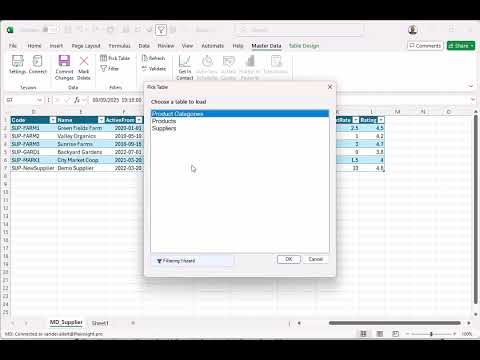
Master Data Hub: Workbook to SQL is Plainsight's Excel-based plugin for managing SQL databases through a familiar spreadsheet interface.
Key benefits: - Manage database tables directly from Excel - No SQL knowledge required - Built-in validation and data quality checks - Version control and audit trail automatically maintained - Familiar Excel interface for business users - Direct integration with data platform databases
Best for: Medium to large-scale Master Data implementations where business users need self-service capabilities with enterprise-grade data management.
Demo video:
SharePoint Lists + Power Apps
For smaller projects, SharePoint Lists combined with Power Apps provide a lightweight Master Data solution.
Key benefits: - No additional license required (included with Microsoft 365) - Quick to set up and deploy - Built-in collaboration and approval workflows - Power Apps provides custom UI on top of SharePoint data - Version history and permissions management included
Best for: Small to medium projects with limited Master Data volume, basic validation requirements, and teams already using Microsoft 365.
Example use cases: - Product category lookups - Customer segmentation flags - Budget input forms - Simple reference lists
SharePoint + Power Apps Pattern
Use SharePoint Lists as the data store and build a Power Apps interface for data entry. Connect your ETL processes to read from SharePoint via connectors or export to CSV for batch processing.
Custom Applications
When out-of-the-box solutions don't fit, custom applications can be developed to meet specific Master Data requirements.
Considerations: - Higher development and maintenance cost - Full control over UI/UX and business logic - Can integrate complex approval workflows - Supports specialized data validation rules - May be necessary for high-security or complex scenarios
Best for: Enterprise-scale implementations with unique business requirements, complex workflows, or specialized security needs that off-the-shelf solutions can't address.
Related Topics
- Analytical Data Store (ADS) - The primary integration point for Master Data
- Star - Dimension Tables - How Master Data enriches dimensional models
- Data Layers and Modeling - Where Master Data fits in the overall architecture